

Promekt
Review upcoming work, prepare its conditions and follow weekly commitments.
- Master plan
- Make Ready
- Weekly plan
- Daily plan
THE ARCHITECTURE OF PRODUCTION
Last Planner System software for planning and tracking construction production.

PROMEKT / PRODUCTION SYSTEM
The schedule sets the direction. On site, each team needs to know what it receives, what must be ready, and what it can promise. Promekt connects these conversations to recorded work.
01 / HOW IT WORKS
Follow the same work from the agreed sequence to the review of its outcome. Each stage keeps its own responsibility.
Trades define what they need to receive and when they hand over the zone.
Constraints have an owner. The team reviews the conditions needed to start in Make Ready.
The team agrees on owners and dates for prepared work.
The site team records outcomes and reviews what was completed and why commitments were missed.
02 / A SITE DECISION
In one zone, ceiling closure depends on the installation and its inspection. The planned date is still there. The pending condition needs to be visible too.
ILLUSTRATIVE EXAMPLE · CEILING / ZONE 02
Previous workVerified
MaterialsVerified
CrewVerified
InspectionPending
Make Ready review
Stays in preparation
Once it is resolved, Make Ready checks whether any other conditions remain; the team then decides whether to make the weekly commitment.
03 / THE PRODUCT
Compare the product views and see what your team can review in each one.
Preparing product views…
Check blockers, predecessor work, and crew availability before making a commitment.
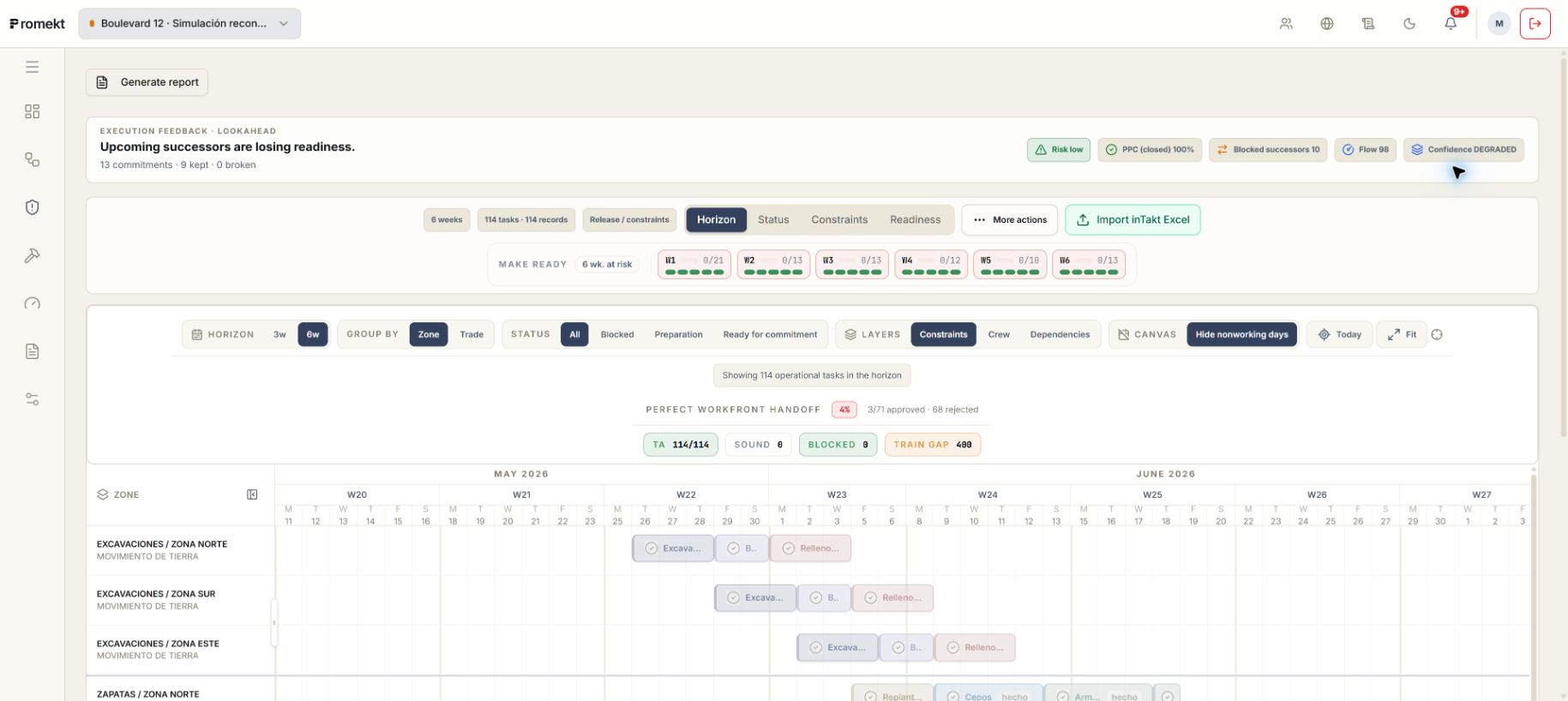 Enlarge screenshot
04 / THE TEAM
See what needs a decision or support, with conditions and owners in view.
Explore the approachConnect milestones, trade handoffs, and preparation for the coming weeks.
Explore the approachConfirm conditions, agree on commitments, and record what happened on site.
Explore the approach05 / TRADE · ZONE · TIME
Read the sequence by zone and understand how one trade enables the next. The diagram explains the logic; teams agree on the real plan.
01Services
02Inspection
03Closure
01Services
02Inspection
03Closure
01Services
02Inspection
03Closure
01Services
02Inspection
03Closure
Illustrative sequence. It does not show actual project progress or automatic scheduling.
06 / GETTING STARTED
Tell us what needs coordination and who is involved.
Walk through sequencing, readiness, and commitments with your team.
Evaluate scope, inputs, and adoption conditions before agreeing on a pilot.
We will review the demonstration scope and next steps with your team.
Explore plans and services07 / LEARN AND EVALUATE
BEFORE YOU START
No. Your schedule keeps its role. Promekt helps bring it into the work planned for the coming weeks and review how commitments are going in the field.
Management can review progress and pending work. Planning can follow up on missing conditions and agree on sequence with the teams.
The walkthrough can start from a zone or group of tasks you care about. Tell us about your situation to guide the discussion.
THE NEXT STEP
Tell us what is difficult to coordinate. We will review the product with you to assess whether it fits your project.

